

Your log footage in color
Browse clips, apply LUTs, check the image, and export graded stills without opening your NLE.

Now on the Mac App Store. macOS 14 Sonoma or later, Apple Silicon.

Real log footage, real .cube LUT, graded live in your browser. The app does even more.
Skip the timeline.
Loglux is a fast macOS app for previewing log footage with your LUTs applied. See your shots in color the moment they hit the drive, no Premiere or Resolve required. Built for directors, DITs, and video creators who need answers now, not after the edit.
Import your log footage.
Drag in a folder from a card, drive, or your desktop. Loglux supports log footage from mirrorless to cinema cameras, so the whole shoot is ready to review in seconds.
- Drag, drop, or ⌘O
- ProRes, plus 10-bit H.264 & H.265
- 200 clips, 80GB ProRes, no sweat
- New clips appear automatically
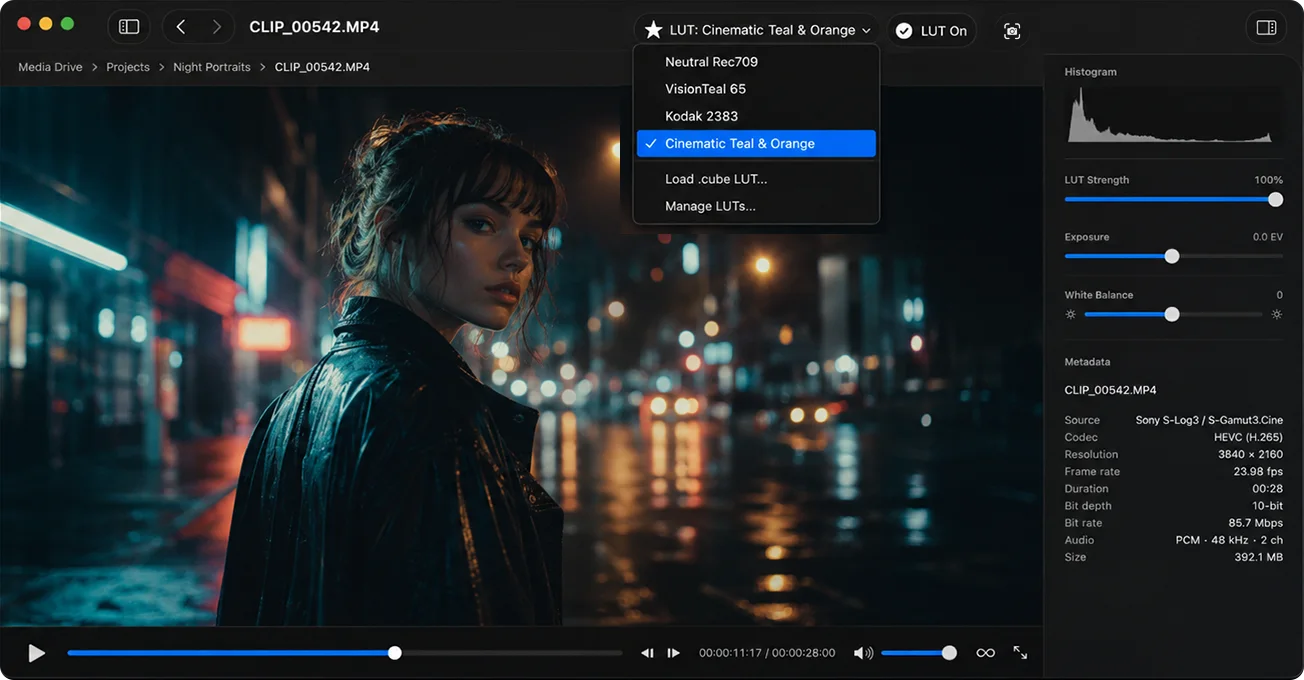
Choose your favorite look.
Import your own .cube LUTs and pick one from the menu. Loglux keeps your library on hand and remembers your default, so the right look is one click away.
- Load any standard .cube LUT
- Set a default that auto-applies to every clip
- Strength slider + one-tap before/after toggle
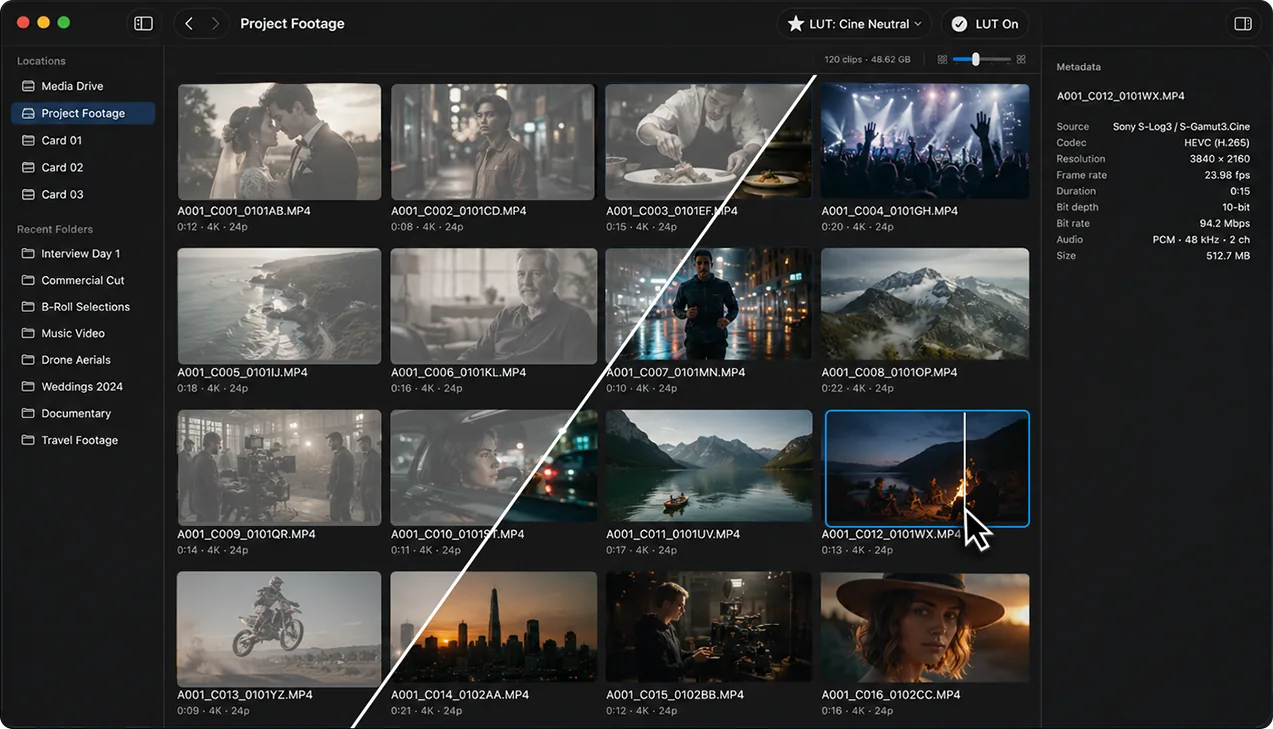
Scan the whole shoot at a glance.
Every clip in the folder, laid out with your LUT already applied. Flip the look off, scrub a clip in place, or check its metadata without opening it.
- Toggle the LUT in the grid
- Scrub clips in place
- Inline clip metadata
- Folder nav in the left panel
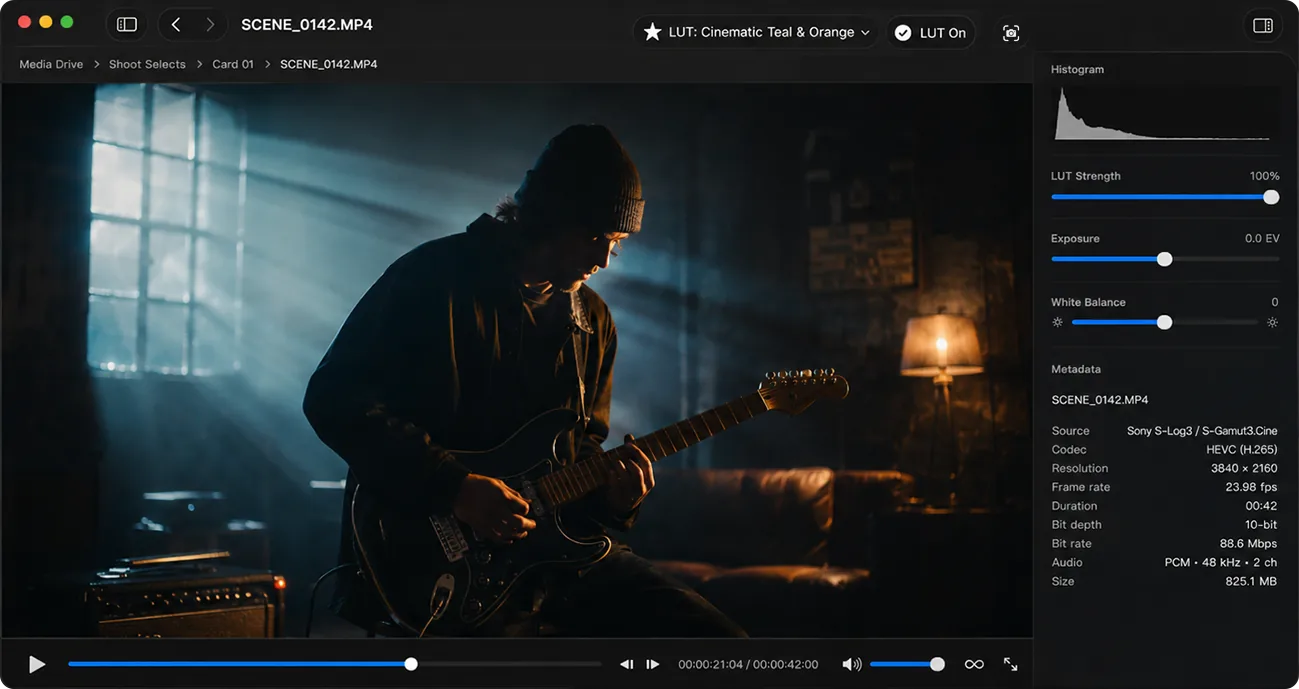
Full playback. Real control.
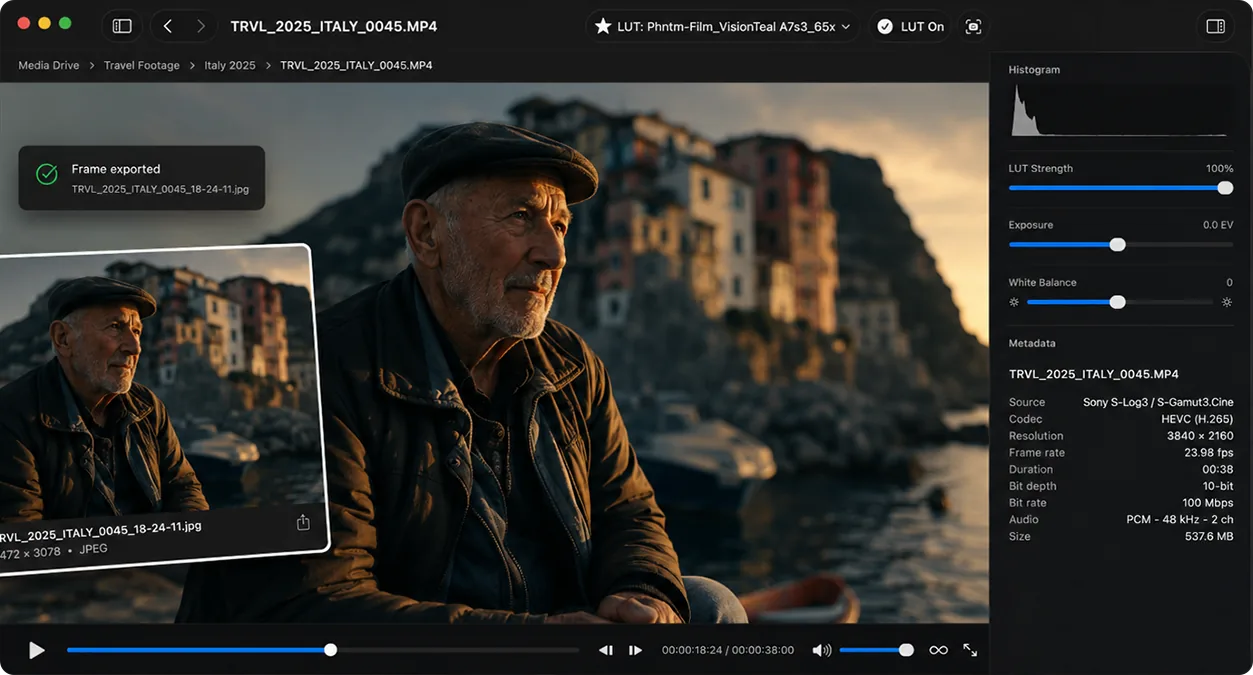
Click in for full playback with frame-accurate control. Fine-tune exposure and white balance per clip and watch it update live, with a luma histogram keeping you honest. Every tweak is saved and undoable. Your originals never change.
- Spacebar, J/K/L, frame stepping
- Live per-clip exposure + white balance
- Luma histogram, saved and undoable
Export a still in seconds.
Grab a full-resolution frame with your LUT and adjustments baked in, ready to text a client, drop in a deck, or hand to your colorist or editor as a reference.
- Press E, full-res PNG
- LUT + adjustments baked in
- Stays on your Mac, no cloud
Stop guessing what's on the card.
Loglux is live on the Mac App Store. Want a heads-up when new features and looks ship? Drop your email below.
Occasional product updates only. No spam, unsubscribe anytime.
Privacy Policy
Privacy-first by design.
Effective date: June 8, 2026
Loglux is a local Mac utility for browsing and previewing video on your computer. It runs entirely on your device: no account, no tracking, no telemetry, and your footage is never uploaded.
Data collection
Loglux does not collect personal data. Your video and LUT files are processed locally on your Mac.
Footage and files
Your clips, folder names, LUTs, previews, metadata, and exported stills stay on your device unless you choose to share them.
No tracking
Loglux bundles no analytics, crash reporting, ads, or third-party SDKs. Nothing about your usage leaves your machine.
Contact
Privacy questions? Email support@loglux.app.
Support
Frequently Asked Questions
Answers to the questions we hear most. Still stuck? Get in touch below.
What is Loglux?
A Mac app for fast review of log footage with a LUT applied. Open a folder and instantly see your clips as thumbnails with your LUT baked in, no Premiere or Resolve required. From open folder to a graded still in under 30 seconds.
Who’s it for?
Solo filmmakers, wedding and brand videographers, documentary shooters, and DITs reviewing log footage (Sony, Canon, Panasonic) on set or right after a shoot.
How much does it cost?
$4.99, a one-time purchase on the Mac App Store. No subscription, no in-app purchases. Loglux is a focused tool for DITs and solo videographers, and a one-time price keeps it that way: buy it once and it’s yours.
Why not just use Resolve, Premiere, or QuickLook?
Those make you commit before you can look. Resolve and Premiere mean a project, a conform, and a LUT on the timeline just to see a card. QuickLook shows your log footage flat and gray. Loglux gives you the whole card as graded thumbnails the moment it mounts, with a before/after toggle and a full-res still in seconds. It’s the look-first pass, not the edit.
What LUTs does it support?
Standard 3D .cube LUTs. Load any .cube, set one as your default, and it auto-applies to every clip, with a 0–100% strength slider and a before/after toggle.
Does Loglux know my camera’s log profile?
Loglux is a LUT box, not a color-managed pipeline. Bring the .cube LUT that matches your camera’s profile and it looks right; it doesn’t auto-convert S-Log3, V-Log, C-Log3, or Log-C for you. That’s by design: it keeps things fast and predictable, and works with any log footage as long as you load the matching LUT.
What footage can it open?
ProRes (422 and 4444) and H.264/H.265, including 10-bit 4:2:2 from mirrorless and cinema cameras. It’s built for the camera-native files you review day to day, not a raw debayering tool, so formats like BRAW and R3D aren’t supported.
Can I adjust exposure and white balance?
Yes. Per-clip exposure (in stops) and a white balance slider, applied in real time and saved automatically. Undo and redo included.
How do I export a still?
Press E for a full-resolution PNG with your LUT and adjustments baked in. It matches exactly what’s on screen.
Can it edit or export video?
No. Loglux is a review-and-stills tool. It never alters your footage; your originals stay untouched.
Do new clips appear automatically?
Yes. Loglux watches the open folder, so new footage shows up instantly, no refresh.
Does my footage get uploaded anywhere?
Never. Everything runs on-device: no network, no cloud, no accounts.
Will it handle big folders?
Yes. It’s built for large shoots, scanning hundreds of clips with fast thumbnails.
What do I need to run it?
macOS 14 Sonoma or later, on an Apple Silicon Mac. A native macOS app, dark mode by design.
About
From one filmmaker to another.
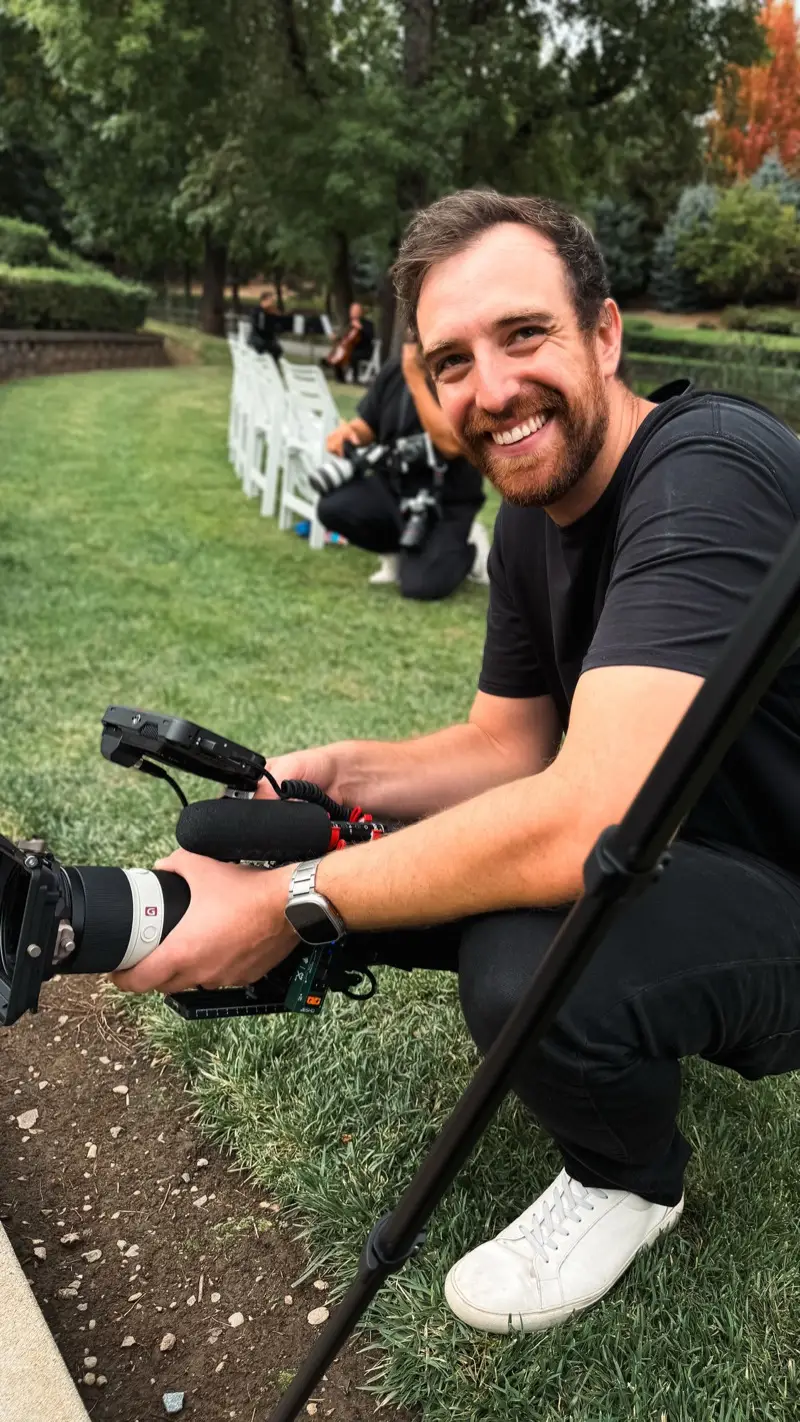
Hi, I'm Dan. I've been making videos for over 20 years. I'm a filmmaker, not a software company, and Loglux started as a tool I built for myself, because checking my own footage meant opening a full editing app just to see what I had.
If you shoot, DIT, or edit for a living, I made this for you.
Show off your beautiful footage, hand a graded still to a client in seconds, and get off set sooner.
And talk to me. Whether something's broken or Loglux just saved your day, I want to hear about it. I answer every email myself, and what you tell me decides what gets built next.
Dan Creator of Loglux · @itsdandickens
Contact
Get in touch.
Have a question, a bug, or a feature request? Send a note and we’ll get back to you.